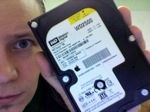
 This hard drive contains over 16,000 photos of my kids growing up. No, I don’t have a backup. Yes, I thought I did. (An untested backup is no backup at all)
I’m 99% sure the PCB failed. The mechanics inside the drive I believe are fine. The problem is, I need to find the exact same model number (WD2500JS-40NGB2) in order to test that theory out.
It will cost over $1,000 to get the drive recovered. I only need to borrow the PCB (circuit board) from a similar drive in order to get the data from it. I would REALLY appreciate it if anyone reading this would tweet, dent, shout, ask their neighbor, etc, etc, if anyone has this specific model of Western Digital 250GB SATA hard drive that I might borrow.
I know it’s a longshot, but who knows. 🙂
Man, I thought I might have a PCB for you, but mine is an ide drive.
Good luck finding one!
Shawn, I tried to leave a comment with a link to somebody selling a used one for $45. I hope the comment just went to moderation–if it didn’t (and just vanished into the aether) and you want me to find the link again, let me know.
Good luck.
Sorry, I got a 120 and a 350. You could get a new one for $50. Although I can see that would not be an answer.
I’d happily spend $50 on a new one. But I’ve already spent over $100 on models that are ALMOST the same, and don’t work.
If someone finds one for sale that is the exact model, please let me know. Really really.
NOTE: The -40NGB2 matters, as I’ve all too painfully discovered.
Sorry, I don’t have anything that might help either. But a thousand bucks? I had my HD recovered for less than a hundred quid at a local repair shop a few months ago.
Hi Shawn,
Here’s three links for you. Found two sites on pricegrabber.com that are selling that exact drive. Also found the same two sites when I searched on froogle.com.
http://www.pricegrabber.com/search_getoffers.php?keyword=WD%20WD2500JS40NGB2&search=WD2500JS-40NGB2
http://www.memory4less.com/m4l_itemdetail.asp?rid=fd_01&itemid=1438689099
http://www.upgradebay.com/c1_itemdetail.asp?rid=8&itemid=168731204
I have several WDC WD2500JD-50GBB0, but no exact match. I have one more WD 250Gig at home too that I’ll check.
Does the drive get recognized at all by the BIOS? Just wondering… I do a lot of data recovery for businesses and residential when they have a hard drive that’s dying, buy you’ve got to have the BIOS recognize the drive. I’m sure you know this. 🙂 I just hate to see anyone loose data!
Marc
Marc,
The drive doesn’t even spin up. With a different PCB, it will spin up but not get recognized properly. Also, with one PCB, the heads started clunking (which scared the crap out of me)
So I figure I need the exact model. I’ll check your links out, thanks a TON.
That’s no good. 🙁 I would agree with you that there’s a chance a new board would fix it since it doesn’t even spin up with the old board. I don’t see HD boards die to often…
I did check at home and the WD 250G drives I have are also the wrong model for you. I was hoping I could help more.
Good luck on your hunt!
Take care,
Marc
Hey Shawn,
Maybe this one will help:
http://www.searchlighttech.com/searchResults.cfm?part=WD2500JS-40NGB2
Good luck!
mistige (Michel)
Shawn,
Hope you have found the one you’ve been looking for. If not, check this board out to see if it would help you.
My HDD WD2500JS – 60NCB1 had the PCB got burned.
I bought this board from eBay for $30.00 PCB# 2060-701335–005 Rev. A, replaced it, and recovered tons of valuable personal data, pictures, video.
If you would like to try this board, feel free to contact me.
I searched for WD2500JS-40NGB2 and found your post. I have one. It’s in my iMac from 2006, and I’m still using it. I on my way to replace it. If you are still in need, send me an email (‘henrik1965’ at the biggest search corp.com). I am in early planning, and it’s inside one of the trickiest machines to replace a HD in.
I was googling it to be sure what to replace it with.
I have on of those exact same drives (WD2500JS-40NGB2) but the drive mechanics are busted (clunking sound). I just removed it from my intel iMac 2006 Intel Core Duo 2.0GHz and I’ll be happy to send it to you for postage cost from Sweden. Let me know if you’re interested!
Looking for the same one — same problem. And my quote is $1900 for recovery! Saw someone teaching drive recovery on YouTube. He stressed that it’s even more than the drive type and model number. Where it was made – i.e., the plan it came from – and the date it was made also make a huge difference, as the boards can be slightly different. He said it needs to come from the same plant and it usually has to be dated within two weeks of the drive you’re trying to recover. If not, it’s very likely the circuit configuration is close, but not the same.
Apparently, finding the right drive is part of the recovery cost estimates…
Mike
Surprise, there is two Henrik from Sweden with a WD2500JS-40NGB2 drive, from a iMac 2006 Intel Core Duo 2.0GHz.
But mine works. It’s now out of the iMac.
The label reads:
S/N: WCANY1185094
MDL: WD2500JS-40NGB2
DATE: 20 JAN 2006
DCM: DSCHCTJAA
Product of Thailand
an Apple logo
250GB HAWKA 655-1259C *2N60411SJUNEA*
HENRIK — The label you included seems about as close to mine as I’m going to get. Though the S/N, DCM and last code numbers differ, they are the same model, they carry Apple logos, they carry the same date and both are out of Thailand.
I could just be chasing a rainbow, but the circuit board in the drive you have may be the same that I need to replace in mine. I’ll still need to bring it to a recovery place to do the work, but hopefully the cost would go down a bit if I bring them the parts they need!
Are you no longer needing the drive?
Mike
mikegodfrey@cox.net
Hey Shawn,
Did you ever recover the data from the WD2500JS-40NGB2, if so how..
I have exactly the same problem 🙁
Thanks,
JoePell
Sadly Joey, I haven’t been able to recover anything. I did get an exact model logic board from someone — but it didn’t make the drive recognizable as anything over 8GB. I found that weird. The drive did spin up and sound healthy, so I’m confident if I shell out the money for a professional service I’ll get my photos back.
Still, what a pain. 🙁
I’ve got this exact model (also in a 2006 iMac) which I’m preparing to replace. It’s got an intermittent issue with the clunking sounds when powering up, so I sometimes need to power on/off 5 or 6 times before things boot up but once running it will work indefinitely – I’ve disabled sleep mode as a work around.
Sounds like you’ve already got a replacement though, but if not, this one would otherwise be going to the trash when I’m done.
Greetings Shawn,
I noticed your post about the logic board on your WD2500JS-40NGB2 drive. Did you replace the U12 chip from your original board to the replacement board? I believe this chip has the firmware data that’s specific to the drive it was manufactured with.
Simply replacing a “like” board is not going to work, based on my research.
Finding a board with closely matched numbers and the EXACT SAME numbers on the logic board is paramount. Seems as though you’ve found the matching board, number wise, so I would try swapping the U12 chips and see if that helps.
NOW…my logic board burned out on my drive so I’m searching for a PCB logic board for my WD drive as well. Here’s what I have:
SATA DRIVE
MODEL: WD2500JS – 00MHB0
DATE: 30 MAY 2006
DCM: DSCACT2AA
PCB 2060-701335-B00 AJ (White Sticker)
PCB 2060-701335-005-rev A (Printed On Circuit Board)
Product of Thailand
If someone has a donor drive/PCB or can assist me in locating another needle in that haystack (PCB) please let me know.
macrover@ymail.com
Cheers!
I have the same problem, I had a power cut and the imac didnt start up. Took the mac to a few different specialist and they said the drive was bad. I have replaced the drive but have pics of my childrens first birthday and would love to recover them.
Im left to replace all parts arround the drive and the specialist said to look for the exact same model, a quick search and found this site, and fingers crossed can get some idea on how to recover my pics.
the drive i have is
MDL: WD2500JS – 40NGB2
Date: 13 Jan 2006
DCM: DSBANTJCA
Hey, I’d like to try and work on some of these drives. I do this for a living and drives that are still spinning but not detecting properly have a great chance of being recoverable.
hey shawn – i have the exact same problem, even the same drive. curious if you ever solved your issue? if so – what did you do?
If anyone still needs assistance with these drives email me, I have a great chance of fixing them.
If anyone still needs assistance with these drives email me, I have a great chance of fixing them.
lesliel@tlsi.net
I have the same issue. I have clicking problem after a power glitch, and it won’t boot up since then.
My iMac has
WD2500 – 40NGB2
21 Jan 2006
DCM: DSBHCTJAA
I want to try swapping logic board first. Can anyone help? I want to “borrow” a logic board. Once I am done, I’ll return it. I promise.
Swapping the controllers won’t always work. The head maps may be different or the ROMs may not be compatible. My offer still stands to check out some of these drives. No evaluation charges.
lesliel@tlsi.net
I too have a WD2500-40NGB2
DCM: DSCACTJAA
jan 21 2006 product of Thailand that seems to just have the pcb that is bad. did Kevin find one? I have an imac and need to recover pictures. If anyone can help I too would greatly appreciate a contact. Thanks.
No I haven’t heard anything from anybody.
Hey everyone! Sorry for not responding sooner.
Yes, I fixed my drive and recovered 100% of my files/data.
I searched around and found some replacement SAME REV. (very important) PCB boards and switched (soldered) out a chip from my damaged board to the new board. Worked like new! (of course this is a simplified description of the process).
That being said, there’s still hope for your drive. I would not trash the drive until you’ve exhausted all resources and you’re certain the drive is non-repairable.
I’ll be glad to help anyone, if I can of course.
Cheers!
Macrover
I have the same issue in that my hard drive’s head is not working. I took it to a drive recovery place and they said that if I got the exact same drive they would swap out the head to get it working
MDL:WD2500js-40ngb2
date: 11Jan2006
DCM: DSBACTJAH
Did you solve the issue? Anyone know where I could get a head for the drive or the same drive?
Hey Macrover,
I’m having a similar issue with my drive. It’s a WD2500JS – 40NGB2, and it’s starting to spin up before it starts clicking. I’m fearing a head crash, but if these drives have a tendency for their PCB to crap out I may as well try to repair it.
Stupid HDDs! I learned my lesson though. I got a nice 2tb backup drive now!
Also have this problem on my HD and i want to replace the board.Where do i find the same HD? does anyone have one in working condition that i can buy?
MDL: WD2500JS-40NGB2
DATE: 19 JAN 2006
DCM: DSBANTJCA
thanks
Carla
An update for everyone — I do hope you all can help each other with these drives, unfortunately, even though I got the PCB, I never got my drive working. Sad day.
Shawn, did you replace the board with one from the same model and DCM number? Also, have you try to swap the U12 chip?
Carla
No, I haven’t. Since our house burned down in January, I sorta lost interest. I do still have the drive though, so perhaps someday. (The drive was at work when the house burned)
ohh..Im so sorry to hear that!! Its sad… But you shouldnt give up, Shawn! Im sure you have very good memories on those pictures! Post all the details from your HD. I’m looking for an HD, if i find something that is compatible with yours Ill let you know! 😉
Carla
The hard drive is from an iMac:
MDL: WD2500JS-40NGB2
DATE: 16 JAN 2006
DCM: DSCACTJAA
If anyone has any luck, I’m all ears. 🙂
Shawn,
I’d like to help you if I can. Email me @ lesliel@tlsi.net.
I have that drive, which I just took out of an iMac. Same numbers. The PCB board must also match, exactly. Mine reads 2060-701335-005 REV A.
This HD crashed Monday this week (August 30, 2010) and just clicks. I already replaced it and it did not contain any data that wasn’t already backed up.
I doubt you want this because it also crashed but I wanted to submit this sice I read all of your blog.
Cheers!
Shawn, i fixed my computer!!! Its working with all my files and pictures exactly how it was before.
I didnt buy the all HD. Just changed the circuit board. But you have to swap the chip (U12), keeping the original one. I took to a especialized company here in London to do that.
Te circuit board (CPB) i bought from a guy in China called Sunny. He will explain you how to do it. his e-mail is sunnydreamspace@otmail.com (e-mail and msn).
Hope it works for you and for everyone else…
good luck!! 🙂
x Carla
Hello Everyone,
I recently just had this problem, I need a replacement for mine as well. If anyone has the parts or hard-drive I could really use the help.
Here is my drive’s info:
MDL : WD2500JS-40NGB2
DATE: 16 JAN 2006
DCM: DSCACTJAA
Thanks!
Brian, talk with this guy. He sorted my problem.
sunnydreamspace@hotmail.com
good luck! 😉
Jeez, me too. Same problem, same exact model number. Also from an Intel iMac. Clunking sound for a few days then nothing. Also lots of photos of kids not backed up. Actually it’s from my ex-wifes, but the kids photos were valuable to me too. Would love to get stuff off it.
-a
I’ll be the latest me, too. I guess these drives have reached the end of their service life. Mine failed with no warning or noises; it just doesn’t spin up. Mine has the following specs:
WD2500JS-40NGB2
20 JAN 2006
DSCHCTJAH
Product of Thailand
250GB HAWKA 655-1259C 2N6041BBZUNEA
The PCB has a sticker 2061-701335-B00 AF. On the board is 2060-701335-005 Rev A.
The drive is mostly backed up, but I’d be willing to spend up to $100 to recover the videos and anything else that wasn’t backed up. I’m thinking since the drive doesn’t spin up it might be worth getting an identical PCB, finding someone to transfer the U12 chip and then trying to recover my data. If anyone has a part to sell please let me know. I’m not willing to send the drive anywhere because we want to protect access to our data. Thanks and I hope we’re all able to find matching suppliers 🙂
just as follow up – i ended up sending my drive into a recovery service. if you’re looking for an inexpensive, reliable service – try lowcostrecovery.com.
got all of my data back and it wasn’t as bad as i thought, price wise.
woo
since we’re all in the same leaky boat, maybe you could disclose how much the service was?
thanks!
i had two drives – the wd2500js which had 50 gb of data i wanted to recover and a seagate which had almost 250 gb – it cost me 870 for both drives. considering the first place i looked at wanted to charge me 850 for the wd alone, it wasn’t bad…
I have a WD2500JS-40NGB2 as well, from an early 2006 iMac. With no warning signs (i.e. sound of HD head clashes or motor problems, etc.) the OS just started freezing up, requiring a hard reboot a few times, and now the HD doesn’t spin up. Removing the PCB exposed what I’m pretty sure is the problem — one of the chips (U1) clearly blew out!
If anyone has a drive or PCB that matches, I’d easily be willing to spend $100+ for it.
Any leads/advice is appreciated. Thanks!
//
Drive Specs:
LBA 488397168
WD2500JS – 40NGB2
03 JAN 2006
DSBHNTJAH
250GB HAWKA 655 – 1259C *2N55405LLUNEA*
PCB Specs:
2061-701335-B00 AF XC 2V11 14U7 B 0003260 6263
My iMac HD WDC WD2500JS-40NGB2 is now making the dreaded “tick tock” sound and will soon be dead!
Specs are below:
Intel ICH7-M AHCI:
Vendor: Intel
Product: ICH7-M AHCI
Speed: 1.5 Gigabit
Description: AHCI Version 1.10 Supported
WDC WD2500JS-40NGB2:
Capacity: 232.89 GB
Model: WDC WD2500JS-40NGB2
Revision: 10.02E04
Serial Number: WD-WCANY1288117
Native Command Queuing: Yes
Queue Depth: 32
Removable Media: No
Detachable Drive: No
BSD Name: disk0
OS9 Drivers: No
S.M.A.R.T. status: Verified
Volumes:
Macintosh HD:
Capacity: 232.57 GB
Available: 28.16 GB
Writable: Yes
File System: Journaled HFS+
BSD Name: disk0s2
Mount Point: /
I need to buy a new one hopefully under $150 so if anyone can help me please let me know.
I need to fix this computer to finish a bunch of work including my first independent feature film, which is now on HOLD indefinitely!
Help please!
Simon, I only chaged the circuit board on the HD and the computer is working. Bought from a guy in China. His email is sunnydreamspace@hotmail.com .
Hope that helps
Carla x
Thank you for the reply Carla,
I have a few questions about this, first of all:
1. What is the model of the circuit board and how much did it cost?
2. Was it easy to put in and are there instructions how to do this somewhere online?
Looking forward to your response…
You may be a saviour!
Thanks Carla,
Simon
cant you take it into a computer repair shop to find your compatible part
Hi Simon,
It depends of the HD, year, numbers, etc…. The guy I’ve told you about, will give you the right circuit board. And also help you with instructions. I had to take to someone only to change one of the units from your circuit board witch you have to keep the original.
It was very cheap. I dont really remember, but i think it cost around 20 pounds (30 us dollars) . Much cheaper and easier then get the HD.
Some tutorials and videos at youtube also help you open your Mac and taking of your HD. I’m not an expert, and it was not to difficult…
I really hope that it can help you , Simon
Carla Zanetti x
Thank you Carla, I have contacted Sunny and I will try to resolve this issue from herein.
Debbie, I know what I need and I am hesitant to deal with computer repair shops as they are almost always out to rip you off! I usually do repairs myself, once I source the parts needed and I have repaired my macs twice before, but thank you for your suggestion!
Simon
No problem, Simon
good Luck! 😉
xx
I’m sitting here reading the words you wrote – “No backup” – over and over. My last backup on my HD was September 2010. I know it would be a disaster if I had a crash. There no excuse these days with HD prices the way they are. You may have just saved my life 🙂
Excellent dude…….I totally guess WD2500JS-40NGB2 hard drive. Pretty useful and cheap too. Thanks for this important info!!!